
Decision Functions
A decision function is a JavaScript function attached to a policy that gates whether the policy fires. When attached, the policy's effect (row filter, column mask, deny, etc.) only applies if the decision function returns { fire: true }. This lets you build conditional policies — "deny access outside business hours", "mask salary only for non-HR users", "allow table access only for analysts querying fewer than 3 tables."
Purpose and when to use
Use decision functions when the gating logic is too complex for a template expression — when you need access to roles, session time, query metadata, or multi-attribute business rules. For straightforward attribute-based filtering, template expressions are simpler and sufficient.
→ Comparison: Glossary → Template expressions vs. decision functions
Field reference
| Field | Type | Required | Default | Notes |
|---|---|---|---|---|
name | string | Yes | — | Unique identifier. |
description | string | No | — | Admin documentation. |
decision_fn | string | Yes | — | JavaScript source code. Must define an evaluate(ctx, config) function. |
decision_config | JSON | No | {} | Static configuration passed as the second argument to evaluate(). Use for thresholds, allowlists, or settings that change without rewriting JS. |
evaluate_context | enum | Yes | — | "session" (evaluated at connect time) or "query" (evaluated per query). See Context modes. |
on_error | enum | Yes | "deny" | What happens if the JS throws: "deny" → policy fires (fail-safe), "skip" → policy is skipped (fail-open). |
log_level | enum | No | "off" | "off", "error", or "info". Controls whether console.log output is captured in proxy logs. |
is_enabled | boolean | No | true | When disabled, the attached policy always fires (as if no decision function exists). |
The JavaScript harness
Your code must define a function named evaluate that accepts two arguments and returns an object with a fire boolean:
function evaluate(ctx, config) {
  // ctx — the context object (session + optional query metadata)
  // config — the static decision_config JSON from the function definition

  return { fire: true };  // policy fires
  // or
  return { fire: false }; // policy is skipped
}
The harness wraps your code in a strict-mode IIFE, validates the evaluate function exists, calls it, and validates the return shape. The result must be a plain object with a boolean fire property — anything else is treated as an error (dispatched to on_error).
The context object (ctx)
The context has two sections. ctx.session is always present; ctx.query is only present when evaluate_context = "query".
{
  "session": {
    "user": {
      "id": "550e8400-e29b-41d4-a716-446655440000",
      "username": "alice",
      "roles": ["analyst", "viewer"],
      "tenant": "acme",
      "department": "engineering",
      "clearance": 3,
      "is_vip": true
    },
    "time": {
      "now": "2026-04-12T10:30:00Z",
      "hour": 10,
      "day_of_week": "Saturday"
    },
    "datasource": {
      "name": "demo_ecommerce",
      "access_mode": "policy_required"
    }
  },
  "query": {
    "tables": [
      { "datasource": "demo_ecommerce", "schema": "public", "table": "orders" },
      { "datasource": "demo_ecommerce", "schema": "public", "table": "customers" }
    ],
    "columns": ["order_id", "customer_name", "total"],
    "join_count": 1,
    "has_aggregation": false,
    "has_subquery": false,
    "has_where": true,
    "statement_type": "SELECT"
  }
}
ctx.session.user — built from three hardcoded fields plus every custom attribute the user has (or has a default for):
ctx.session.user.id— UUID stringctx.session.user.username— stringctx.session.user.roles—string[]of active role names the user belongs to (direct + inherited)ctx.session.user.<attribute_key>— typed value (string / number / boolean / array) for every user-entity attribute definition. Missing attributes resolve to the definition'sdefault_value, ornullif the default is NULL. Custom attributes with the same key as a built-in lose — the built-in always wins.
Other proxy_user columns (is_admin, is_active, timestamps, password_hash) are intentionally not exposed. The admin-plane is_admin flag is unrelated to data-plane policy logic — use role membership (ctx.session.user.roles.includes(...)) for "privileged user bypass" patterns.
ctx.session.time.now — the evaluation timestamp (RFC 3339), not the session start time. hour is 0–23, day_of_week is the full English name.
ctx.query — only present when evaluate_context = "query". Contains metadata extracted from the logical plan after DataFusion parses the query.
Context modes
evaluate_context = "session"
Evaluated once at connect time. Affects both schema visibility and query enforcement. Use for decisions that don't change within a session — user identity, time-of-day access, role-based gating.
- Pros: evaluated once per connection (cheap), affects what the user sees in
information_schema - Cons: no access to
ctx.query(no per-query decisions), cached for the session duration
evaluate_context = "query"
Evaluated on every query. Affects query enforcement only — schema visibility is not changed (columns/tables remain visible in information_schema even if the decision function will deny them at query time).
- Pros: access to
ctx.query(tables, columns, joins, aggregation), per-query granularity - Cons: evaluated on every query (~1ms overhead), does not affect schema metadata visibility
Which to choose
| Use case | Context mode |
|---|---|
| Business hours access control | session |
| Role-based policy gating (analysts only) | session |
| "Deny if query touches more than N tables" | query |
| "Deny if query uses aggregation on sensitive table" | query |
| "Allow only specific query patterns" | query |
Step-by-step tutorial
Example: business hours access control
Goal: a table_deny policy on salary_data that only fires outside business hours (Mon–Fri 9–17 UTC).
Create the decision function:
- Name:
business-hours-only - Evaluate context:
session - On error:
deny(fail-safe — if JS breaks, deny access) - Config:
{ "start_hour": 9, "end_hour": 17 } - JS source:
javascriptfunction evaluate(ctx, config) { const hour = ctx.session.time.hour; const day = ctx.session.time.day_of_week; const weekdays = ["Monday", "Tuesday", "Wednesday", "Thursday", "Friday"]; const isBusinessHours = weekdays.includes(day) && hour >= config.start_hour && hour < config.end_hour; // fire = true → policy fires → table is denied // So we fire when it's NOT business hours (deny outside hours) return { fire: !isBusinessHours }; }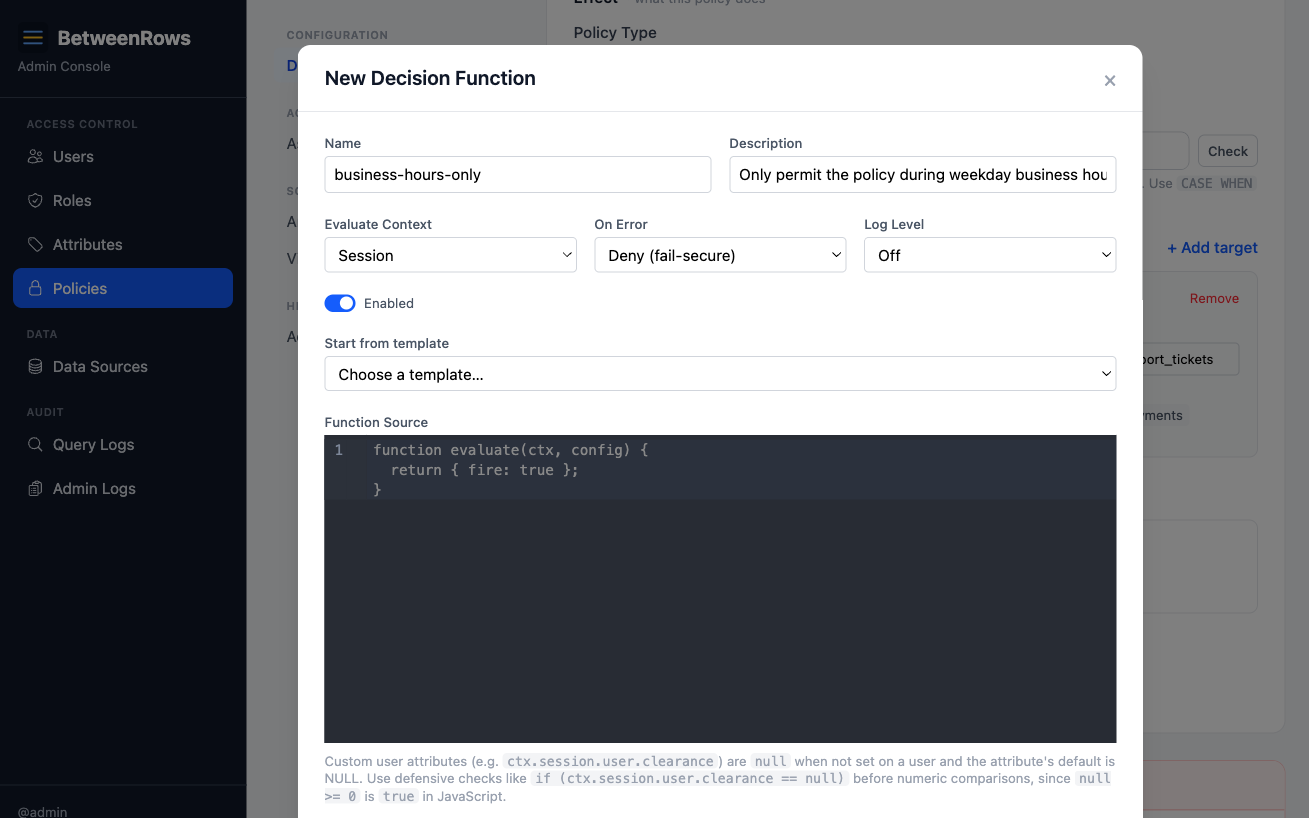
- Name:
Test the function using the built-in test runner (
POST /decision-functions/test). Provide a mock context with different hours/days and verify thefireresult matches expectations.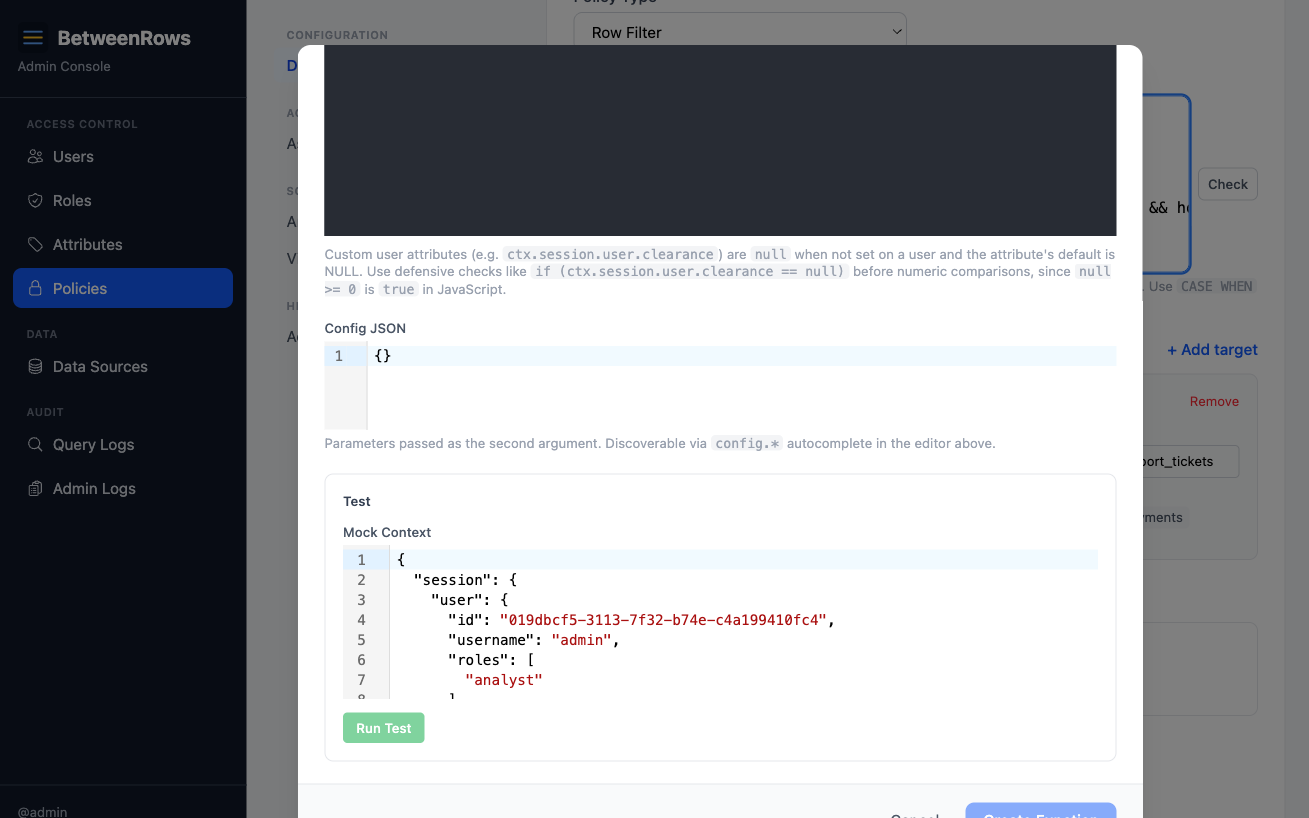
Create the policy — a
table_denyonsalary_data— and attach the decision function viadecision_function_id.Verify: connect during business hours → table is accessible. Connect outside → "table not found."
Patterns and recipes
Role-based gating
function evaluate(ctx, config) {
  return { fire: !ctx.session.user.roles.includes("admin") };
}
Attach to a column_mask — admins see raw values, everyone else gets the mask.
Query complexity limit
function evaluate(ctx, config) {
  return { fire: ctx.query.join_count > config.max_joins };
}
Attach to a table_deny with evaluate_context = "query" and config: { "max_joins": 3 }. Denies access when the query is too complex.
Datasource-aware gating
function evaluate(ctx, config) {
  return { fire: ctx.session.datasource.access_mode === "open" };
}
Only fire the policy on open-mode data sources.
Testing and debugging
The test runner
The admin UI includes a built-in test runner for decision functions. You can also use the API directly:
POST /api/v1/decision-functions/test{
"decision_fn": "function evaluate(ctx, config) { return { fire: ctx.session.user.roles.includes('admin') }; }",
"decision_config": {},
"evaluate_context": "session",
"test_context": {
"session": {
"user": {
"id": "550e8400-e29b-41d4-a716-446655440000",
"username": "alice",
"roles": ["analyst"],
"tenant": "acme"
},
"time": { "now": "2026-04-12T10:00:00Z", "hour": 10, "day_of_week": "Saturday" },
"datasource": { "name": "demo_ecommerce", "access_mode": "policy_required" }
}
}
}The response tells you:
success— did the function execute without error?result.fire— would the policy fire?result.fuel_consumed— how many WASM instructions were used (out of 1M limit)?result.time_us— execution time in microsecondsresult.logs— anyconsole.logoutput capturederror— error message if the function failed
Test with different mock contexts to cover your edge cases: different users, different times, different roles, missing attributes. The test runner compiles and executes the JS in the same WASM sandbox used in production — it's not a simulation.
Logging with log_level
| Level | Behavior |
|---|---|
"off" | No log capture. console.log output is discarded. Best for production performance. |
"error" | Captures error output (exceptions, stack traces). Use during initial development. |
"info" | Captures all console.log output. Use for debugging logic issues — add console.log(ctx.session.user) to inspect what the function receives. |
Log output appears in the proxy's structured logs (visible via docker logs or your log aggregator) and in the test runner response's result.logs array.
TIP
Start with log_level: "info" while developing, then switch to "off" for production. The overhead is minimal, but unnecessary log volume adds up at scale.
Debugging checklist
When a decision function isn't behaving as expected:
- Test with the test runner — does the function return the expected
firevalue for a mock context matching the real user? - Check
on_error— if"deny", a JS exception silently causes the policy to fire. The test runner will show the error. - Check
is_enabled— a disabled function means the policy always fires. - Check
evaluate_context—"session"is evaluated once at connect time (cached for the session). If you changed user attributes, the user needs to reconnect. - Check the audit log —
policies_appliedin the query audit shows whether the decision function fired, skipped, or errored for each query. - Add
console.log— setlog_level: "info"and addconsole.log(JSON.stringify(ctx.session.user))to see exactly what the function receives.
Composition
- Any policy type can have a decision function. Row filters, column masks, column allow, column deny, and table deny all support
decision_function_id. - Decision function disabled → policy always fires. Setting
is_enabled = falseon the decision function is equivalent to removing it — the policy applies unconditionally. decision_wasmis NULL → policy always fires. If the JS hasn't been compiled yet (rare edge case during migration), the policy fires as a safe default.
How it works
Decision functions run inside a WebAssembly (WASM) sandbox powered by wasmtime. This provides strong isolation guarantees:
- No filesystem access. Your JS cannot read or write files on the proxy host.
- No network access. No
fetch(), no sockets, no DNS. Decision functions are pure compute. - No host function calls. The sandbox exposes only stdin/stdout for passing the context in and the result out.
- Fuel-limited execution. Each invocation gets a budget of 1,000,000 WASM instructions. If your code exceeds this (e.g., an infinite loop), execution is killed and the
on_errorhandler fires. The fuel limit is not currently configurable per function — it's a system-wide safety bound.
What you can use in JavaScript
Decision functions run on QuickJS (a lightweight ES2020 engine), not V8 or Node.js. This means:
Available:
- Core JavaScript (ES2020):
let/const, arrow functions, destructuring, template literals,for...of, spread/rest, optional chaining (?.), nullish coalescing (??) JSON.parse()/JSON.stringify()Math.*,String.prototype.*,Array.prototype.*,Object.*,RegExpconsole.log()(output captured in proxy logs whenlog_levelis"info"or"error")
Not available:
fetch(),XMLHttpRequest, or any network APIsetTimeout/setInterval(synchronous execution only)require()/import(single-file functions, no modules, no npm packages)async/await/Promise(synchronous only)- Node.js APIs (
fs,path,crypto,Buffer, etc.) - Web APIs (
TextEncoder,crypto.subtle,URL, etc.) Date()constructor works but uses UTC; preferctx.session.time.*for consistency
Sandbox and isolation
Decision functions run inside a wasmtime WASM sandbox with capability-based isolation (no filesystem, no network, no host memory, no globals, no cross-invocation state). Fuel limits kill runaway code; errors are handled via on_error. See Threat Model for the specific attack vectors and their enforcement points.
Compilation pipeline
Your JavaScript is compiled to WASM at save time, not at query time:
- Save — the JS source is compiled via Javy in dynamic mode. This produces a small bytecode module (1–16 KB) stored in the database alongside the source.
- Query time — the bytecode module is instantiated (~1ms) and linked with a pre-compiled QuickJS engine plugin that was loaded once at proxy startup. No JIT compilation happens at query time.
- Result — stdout JSON is parsed for
{ fire: boolean }.
What happens when a function has a bug
Decision functions are designed to fail safely. Every failure mode has a defined behavior:
| Failure | What happens | Controlled by |
|---|---|---|
| JS throws an unhandled exception | on_error fires: "deny" → policy applies (fail-safe), "skip" → policy skipped (fail-open) | on_error field |
| Infinite loop / excessive computation | Fuel exhausted → execution killed → on_error fires | Fuel limit (1M instructions) |
Invalid return value (not { fire: boolean }) | Treated as an error → on_error fires | on_error field |
| WASM compilation fails (corrupt bytecode) | Treated as an error → on_error fires | on_error field |
| Decision function is disabled | Policy fires unconditionally (as if no function attached) | is_enabled field |
The proxy never crashes from a decision function bug. Errors are logged and the query continues with the on_error result. The user sees normal query results (or a denial) — never a proxy error.
Why on_error = "deny" is the recommended default
If you're gating a security-relevant policy (deny, mask, filter), you want bugs to fail-safe: when in doubt, apply the policy. Use "skip" only for non-security-relevant policies where availability matters more than enforcement (e.g., optional analytics filtering).
Why WASM is safe
WASM provides capability-based isolation — the sandbox starts with zero capabilities and only gets what the host explicitly provides. BetweenRows provides nothing beyond stdin/stdout for passing context in and results out:
- A malicious or buggy function cannot exfiltrate data (no network access)
- It cannot read other users' contexts (each invocation gets only its own
ctx) - It cannot persist state between invocations (no globals survive across calls)
- It cannot affect other decision functions (each runs in its own instantiation)
- It cannot DoS the proxy (fuel limits kill runaway code)
This is fundamentally different from running user-supplied JS in a language-level sandbox — WASM isolation is enforced at the runtime level by wasmtime's compiler, providing hardware-grade boundaries that cannot be bypassed by clever JS.
Future language support
The decision function entity has a language field (currently only "javascript" is supported). The WASM-based architecture means any language that compiles to WASM could be supported in the future — Rust, Go, Python (via wasm32 targets), or domain-specific languages. The language field is stored but only "javascript" is wired to a compiler today.
Performance
Decision functions add latency to every evaluation:
| Context mode | When evaluated | Overhead per policy with a decision function |
|---|---|---|
session | Once at connect time | ~1ms — paid once, amortized across all queries in the session |
query | Every query | ~1ms per query per policy — adds up if many policies have query-context decision functions |
The ~1ms includes WASM module instantiation, JS execution, and result parsing. The QuickJS engine plugin is pre-compiled at startup and reused across all functions — only the per-function bytecode (~1–16 KB) is compiled per invocation.
TIP
Prefer evaluate_context = "session" when possible — it's evaluated once per connection instead of once per query. Use "query" only when you need ctx.query metadata (tables, columns, aggregation).
If a user has 5 policies and 3 have query-context decision functions, each query adds ~3ms of decision function overhead on top of the query execution time. For most workloads this is negligible, but it's worth monitoring for high-throughput data pipelines.
Limitations and catches
- Decision functions cannot make network calls or produce side effects. They run in a WASM sandbox — pure compute only. No
fetch(), noXMLHttpRequest, no file system access. - Runaway JS is killed automatically. Each invocation has a fuel budget. Infinite loops exhaust the fuel and trigger the
on_errorhandler (default: policy fires). on_error = "deny"is the safe default. If your JS throws an unhandled exception, the policy fires (fail-safe). Use"skip"only when the policy is non-security-relevant and you'd rather fail-open.console.logoutput appears in proxy logs (whenlog_levelis"info"or"error"). Use it for debugging. Output does not affect the decision result.- Session-context decisions are cached for the connection. If the user's attributes change mid-session, the decision is not re-evaluated until they reconnect. Query-context decisions are re-evaluated on every query.
- Query-context does not affect visibility. Even if the decision function would deny the query, columns and tables remain visible in
information_schema. The denial happens at query time, not at the schema level. - Deleting a decision function requires detaching it from all policies first. The API rejects deletion if any policy references it (returns 409).
→ Full list: Known Limitations
Troubleshooting
- "Decision function compilation failed" — JS syntax error or unsupported construct. Check the error message and fix the source.
- Policy fires when it shouldn't (or vice versa) — use the test runner with a mock context to verify the logic. Check
on_error— if"deny", a silent JS error causes the policy to fire. - Decision function has no effect — check:
is_enabledon the function,decision_function_idset on the policy,decision_wasmis not null (check via API).
→ Full diagnostics: Audit & Debugging · Troubleshooting
See also
- Glossary → Template expressions vs. decision functions — when to use which
- Policies overview — which policy type to attach a decision function to
- Template Expressions — the simpler alternative for attribute-based logic